VRChat

【VRM】V-Base Studio - 初期状態の顔を変える。シェイプキーを減らす。

  • ダウンロード商品
    ¥ 980

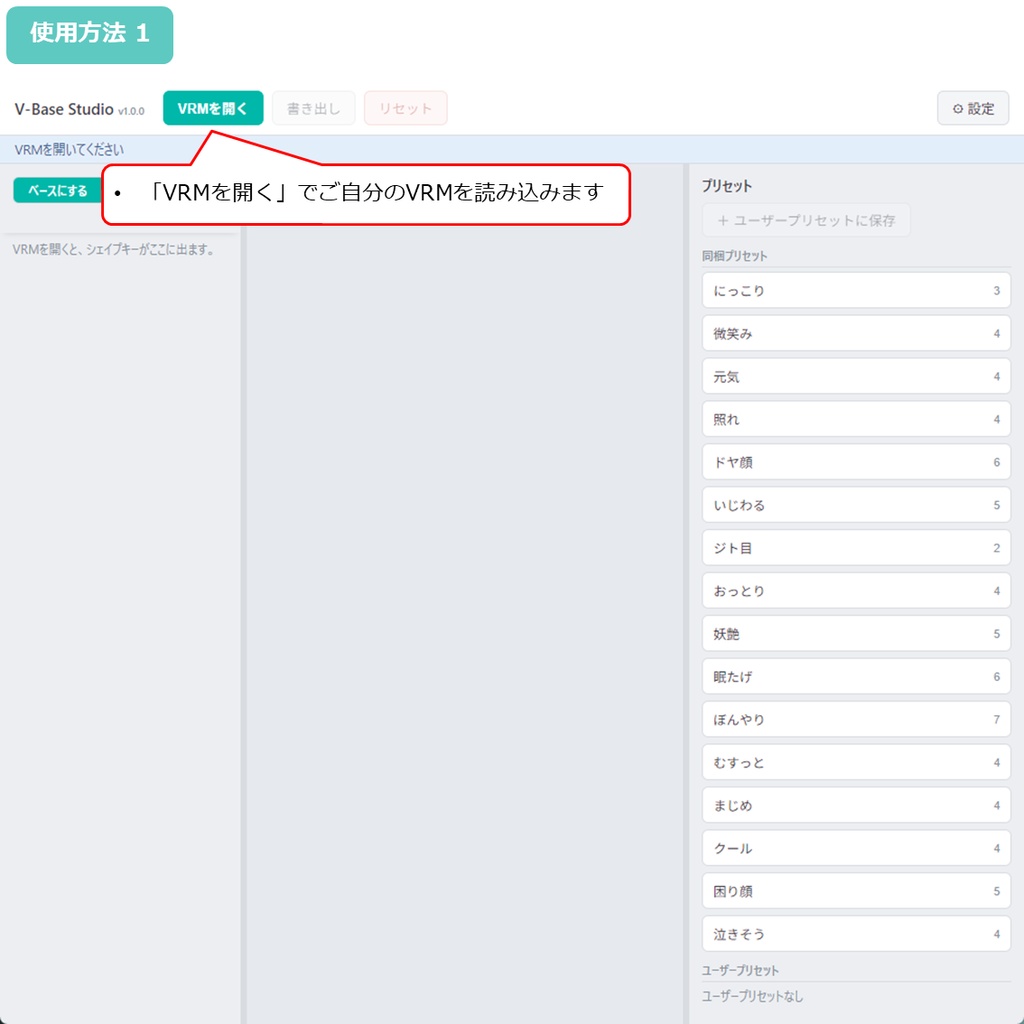
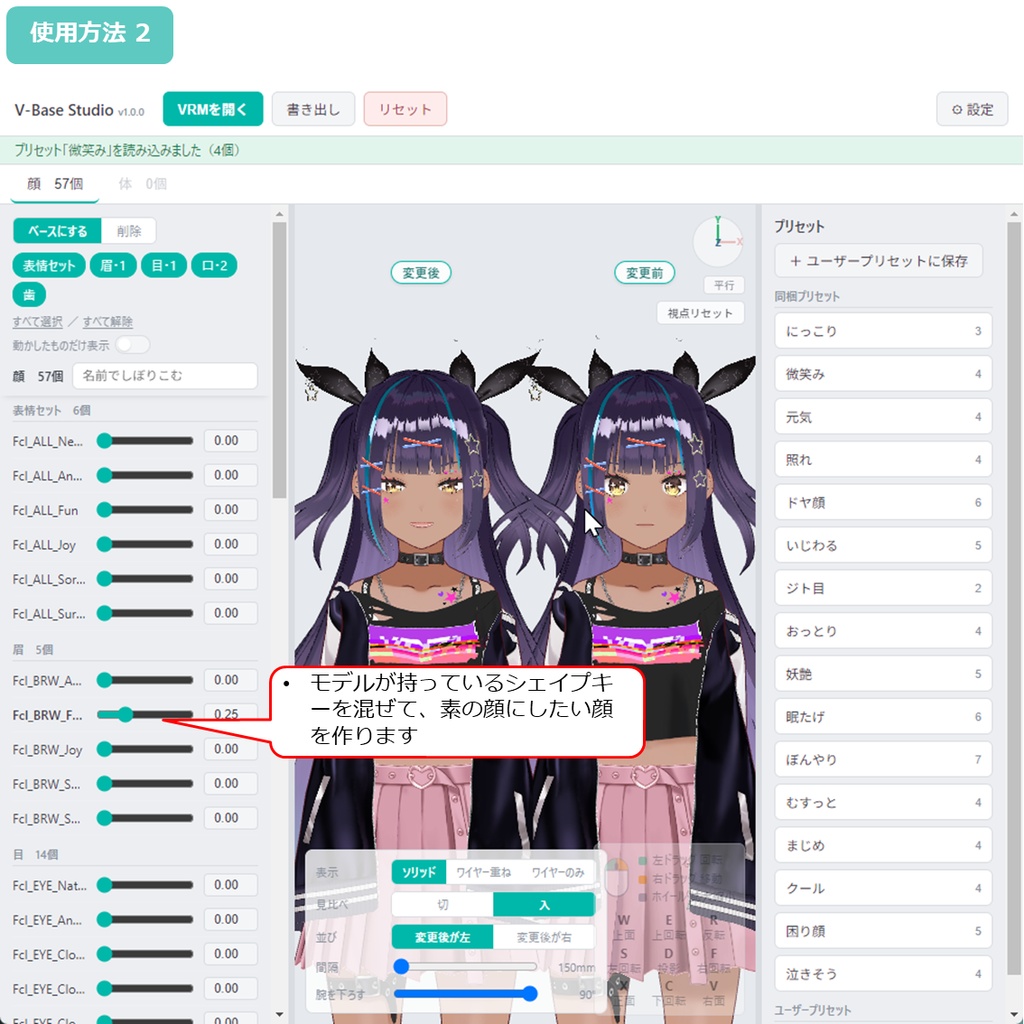
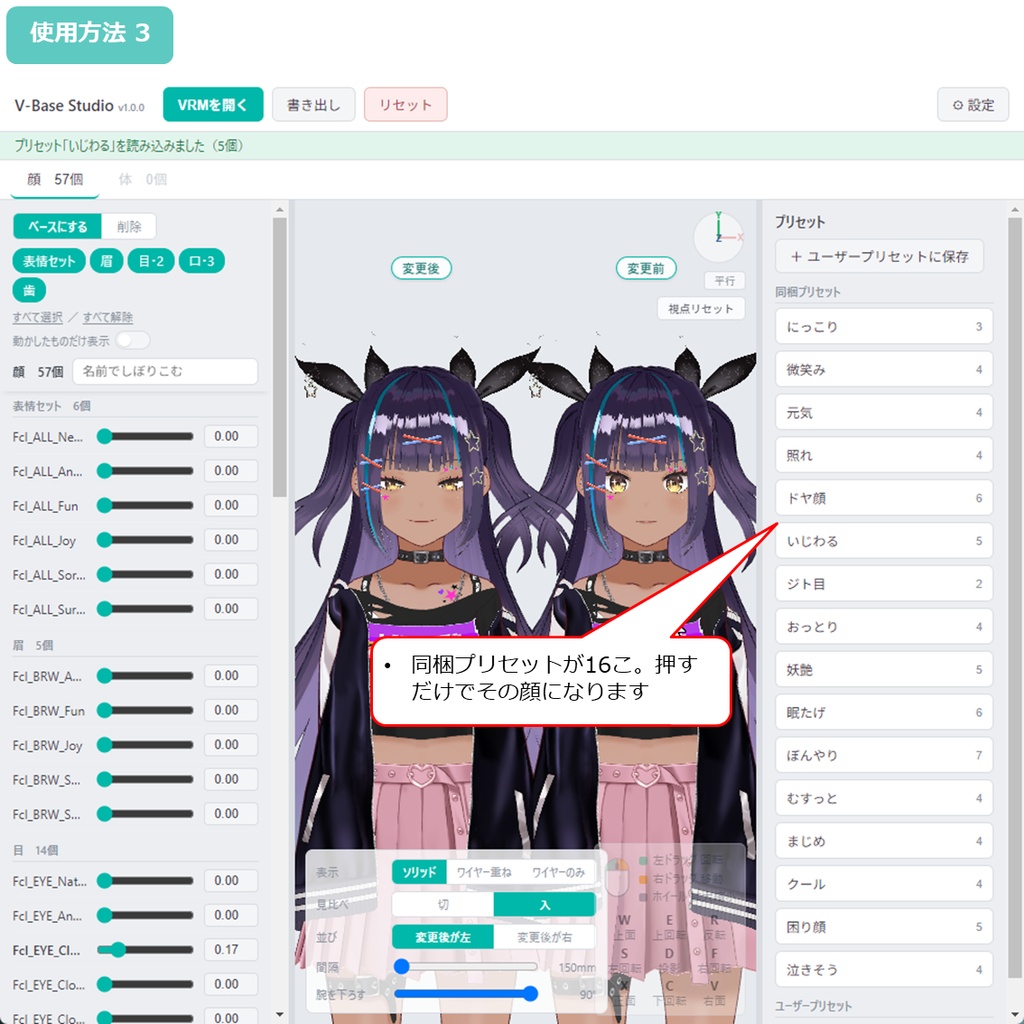
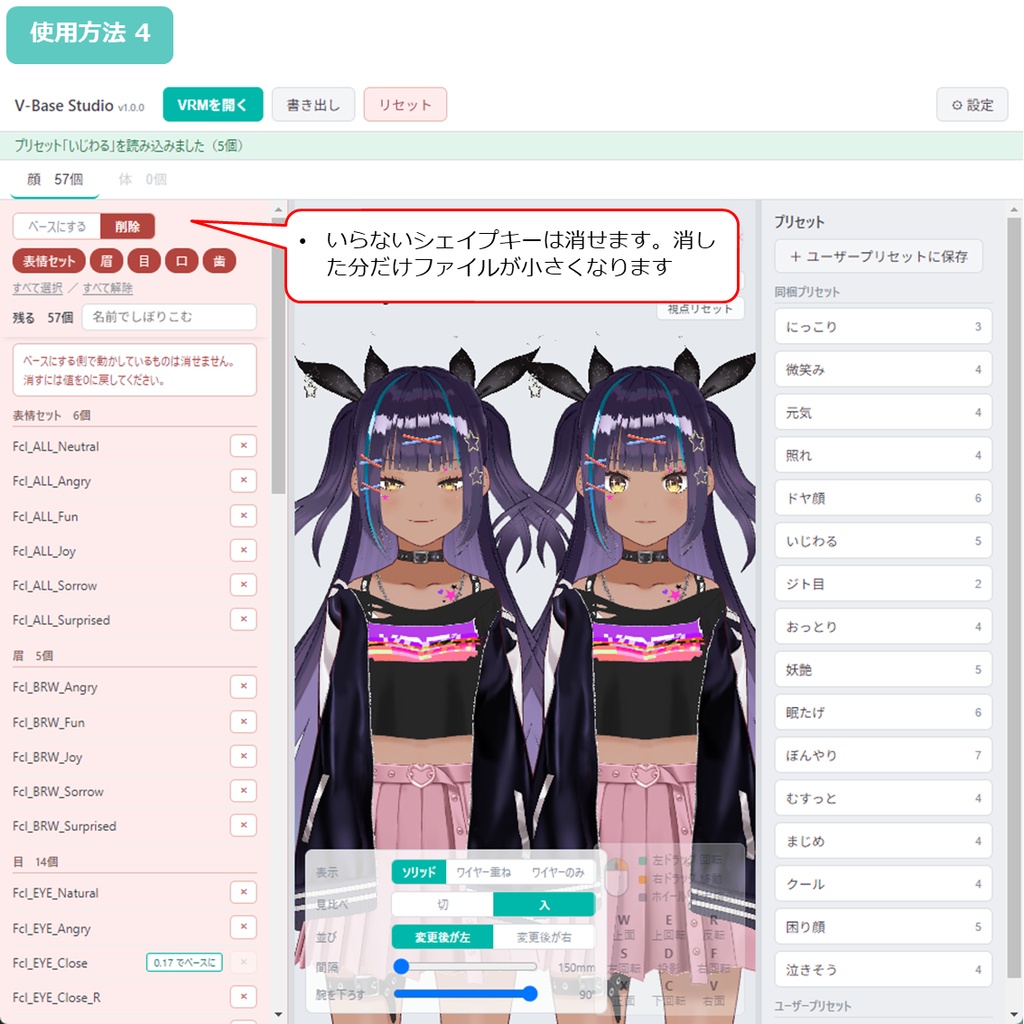
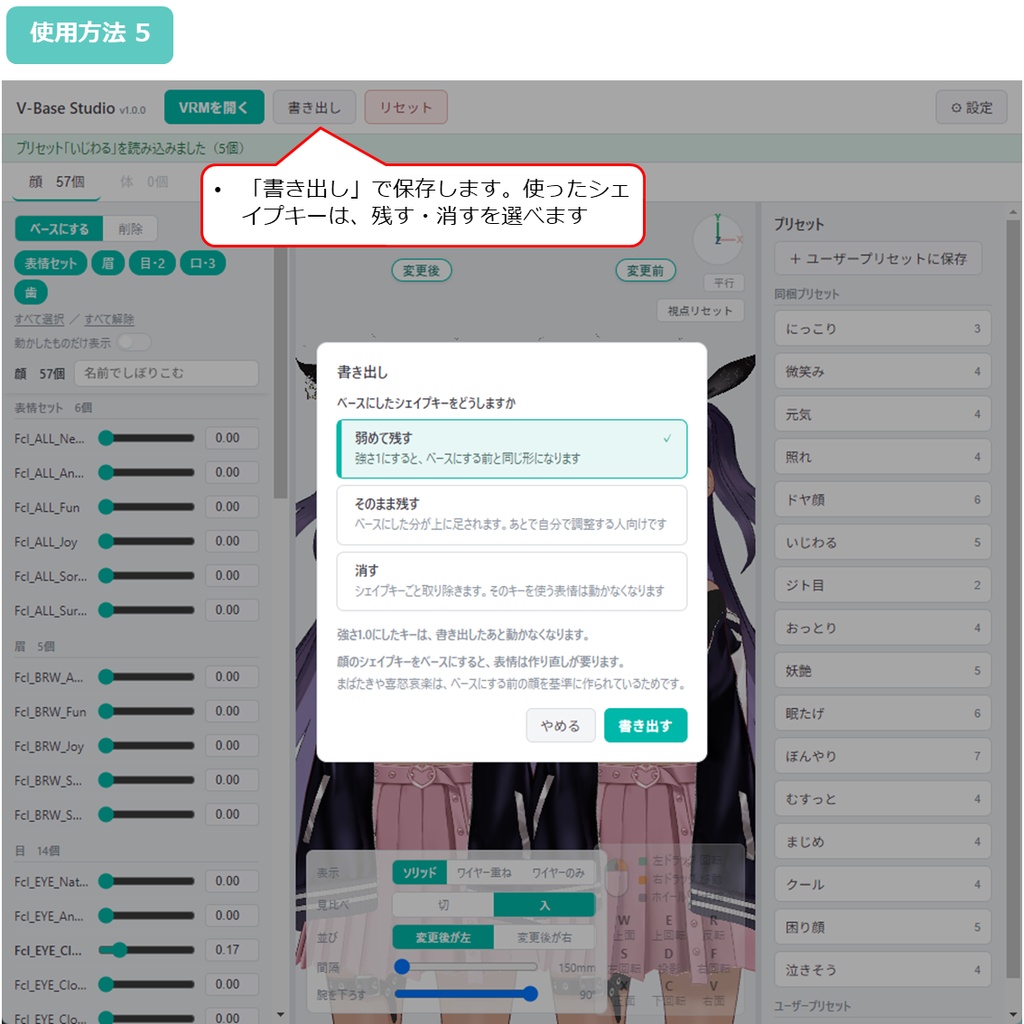
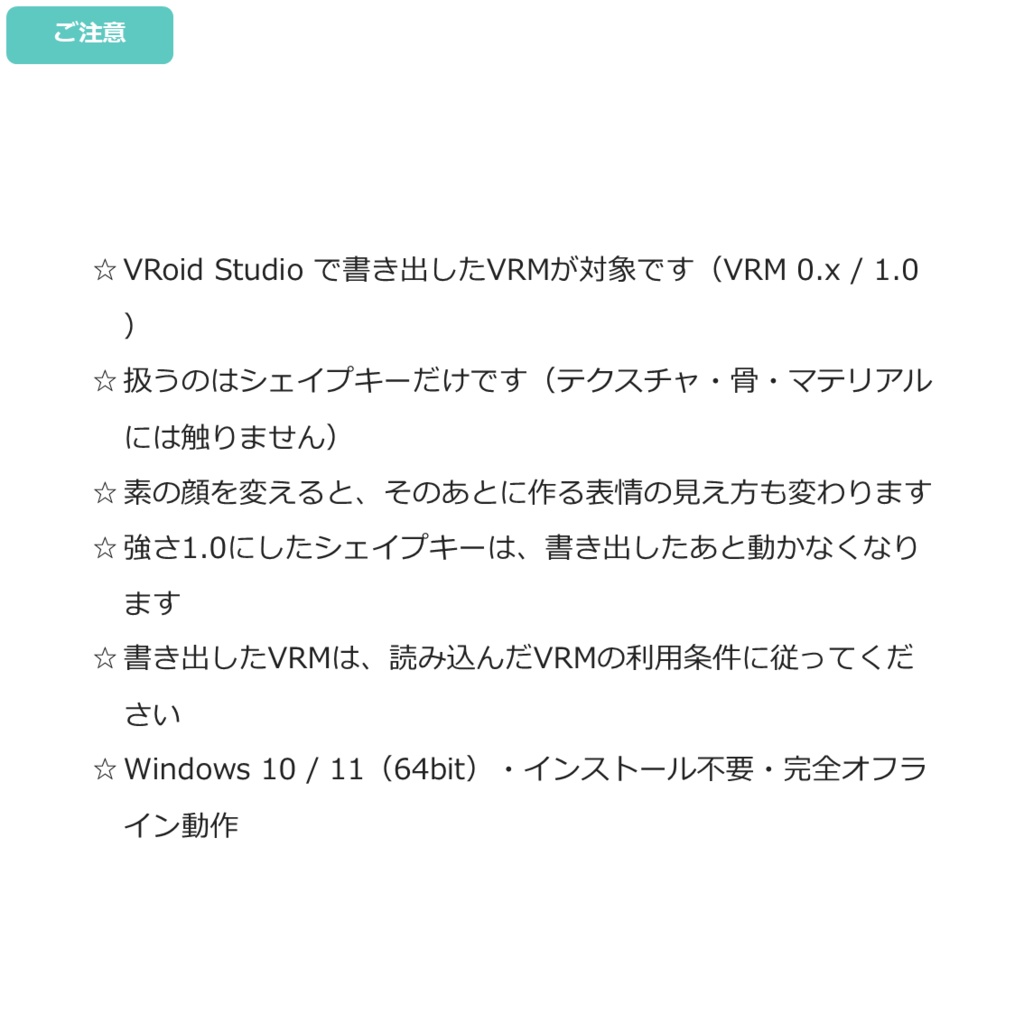
◆商品概要 この子を「じと目」にしたい。いつも少し笑っている顔にしたい。 そう思っても、VRMを書き出すと顔はいつものままです。 シェイプキーは全部0に戻っているからです。 V-Base Studio は、モデルがもともと持っているシェイプキーを混ぜて、 その顔を「初期状態」にできるWindows用ツールです。 顔の型を16こ入れてあるので、押すだけで試せます。 あわせて、使っていないシェイプキーを消して軽くできます。 シェイプキーは思っているより重く、VRoid Studio のVRMは57本で約6MB。 パーフェクトシンク付きなら117本で約12.6MB=ファイルの3〜5割です。 まぶたしか動かない1本でも約0.11MBあります。 Unity も Blender も要りません。VRMを開いて、選んで、書き出すだけです。 ◆できることは2つです 【初期状態の顔を変える】 モデルが持っているシェイプキー(笑顔・じと目・への字口…)を混ぜて顔を作り、 それを「素の顔」として確定させます。 書き出したVRMは、開いた瞬間からその顔です。 顔の型を16こ、はじめから入れてあります。 にっこり/微笑み/元気/照れ/ドヤ顔/いじわる/ジト目/おっとり/ 妖艶/眠たげ/ぼんやり/むすっと/まじめ/クール/困り顔/泣きそう 押すだけでその顔になり、そこから自分で調整もできます。 VRoid Studio 製のモデルはシェイプキーの名前が共通なので、別のキャラにもそのまま当たります。 【シェイプキーを減らす】 使わないシェイプキーを選んで消します。表情のクリップの番号は自動でつけ直します。 消した分はそのままファイルが小さくなります。パーフェクトシンクの60本を消して約6.5MB(実測)。 どちらも、部位ごとに区切った一覧から選びます。目・口などで絞り込み、名前でも探せます。 変更前と並べて見比べながら決められます。自動では何もしません。 ◆内容 V-Base Studio 本体 取扱説明書(日本語・英語) 利用規約 ◆使用方法 1. ZIPを展開 2. V-Base Studio.exe を起動 3. 「VRMを開く」から VRMファイルを読み込み 4. いらないシェイプキーを選んで消す/素の形にしたいものはつまみを動かす 5. 「書き出し」から保存 - 使用方法動画 https://x.com/H3Atelier/status/2093499216459153686 ◆ご注意 ・素の顔を変えると、そのあとに作る表情の見え方も変わります。まばたきや喜怒哀楽は、変える前の顔を基準に作られているためです。 ・「消す」は、使っていないシェイプキーであれば影響しません。消したシェイプキーを使う表情だけが動かなくなります。 ・強さを1.0にしたシェイプキーは、その形で固定されるので、書き出したあと動かなくなります。 ・テクスチャ・骨・マテリアルには触りません。扱うのはシェイプキーだけです。 ・書き出したVRMの中では元に戻せません。書き出す前のVRMは必ず残してください。 ・VRoid Studio 製のVRM(0.x/1.0)が対象です。シェイプキーに名前が無いモデルは、一覧に出ないことがあります。 ・動作環境:Windows 10 / 11(64bit)。インストール不要・完全オフライン動作・日本語/英語。 ◆クレジット表記について クレジットの記載は不要です。 (ご利用は、読み込んだVRMの利用条件に従ってください。) ◆更新履歴 2026年8月29日 v1.1.0 ベースにしたあと、まばたきなどの表情が行き過ぎる件に対応する 書き出しの選択肢を追加しました(ベータ) 2026年8月28日 v1.0.0 公開 --- ◆Overview You want this character to have scornful eyes. Or a face that is always smiling a little. But when you export the VRM, the face is the usual one again, because every shape key is back at zero. V-Base Studio is a Windows tool that mixes the shape keys your model already has and makes the result the face it starts with. 16 face types are built in, so you can try them with one press. It also lets you remove shape keys you never use, and make the file lighter. Shape keys weigh more than people think: 57 of them take about 6MB. With PerfectSync, 117 keys and about 12.6MB, or 30 to 50% of the whole file. Even a key that only moves the eyelids is about 0.11MB. No Unity, no Blender. Open the VRM, pick, export. ◆Two things it does [Change the face it starts with] Mix the shape keys your model has (a smile, scornful eyes, a downturned mouth...) into a face, and fix that as the plain face. The VRM you export wears it from the moment it opens. 16 face types are built in: Smiling / Slight smile / Cheerful / Bashful / Smug / Sly / Scornful eyes / Gentle / Alluring / Sleepy / Vacant / Sulky / Earnest / Cool / Troubled / About to cry Press one and the face is there. You can adjust it from that point. VRoid Studio models share the same shape key names, so a preset works on another character too. [Cut down the shape keys] Pick the shape keys you do not need and remove them. Expression clip indices are renumbered automatically. Whatever you remove comes straight off the file size. Removing the 60 PerfectSync keys: about 6.5MB (measured). For both, you choose from a list split by group. Narrow it by eyes, mouth and so on, or search by name. Decide while comparing against the original beside it. Nothing happens automatically. ◆Contents V-Base Studio User manual (Japanese and English) Terms of use ◆How to use 1. Extract the ZIP 2. Start V-Base Studio.exe 3. Load a VRM with Open VRM 4. Pick the shape keys you do not need and remove them, or move the sliders for the ones you want as the base 5. Save with Export How-to Video: https://x.com/H3Atelier/status/2093499216459153686 ◆Please note ・Changing the plain face changes how expressions look afterwards. Blink and emotion shapes were built against the face as it was before. ・"Remove" does not affect anything as long as the shape key was unused. Only the expressions that used the removed key stop working. ・A shape key set to strength 1.0 is fixed at that shape, so it no longer moves after export. ・Textures, bones and materials are never touched. This tool handles shape keys only. ・Nothing can be undone inside the exported VRM. Always keep the VRM you had before exporting. ・For VRMs made with VRoid Studio (0.x / 1.0). Shape keys with no names may not appear in the list. ・Requirements: Windows 10 / 11 (64-bit). No installation, fully offline, Japanese and English. ◆About credit No credit is required. (Use is still subject to the terms of the VRM you loaded.) ◆Update history 2026/8/29 v1.1.0 Added an export option (beta) for expressions such as blinking          overshooting after you set a face as the base 2026/8/28 v1.0.0 Released ---
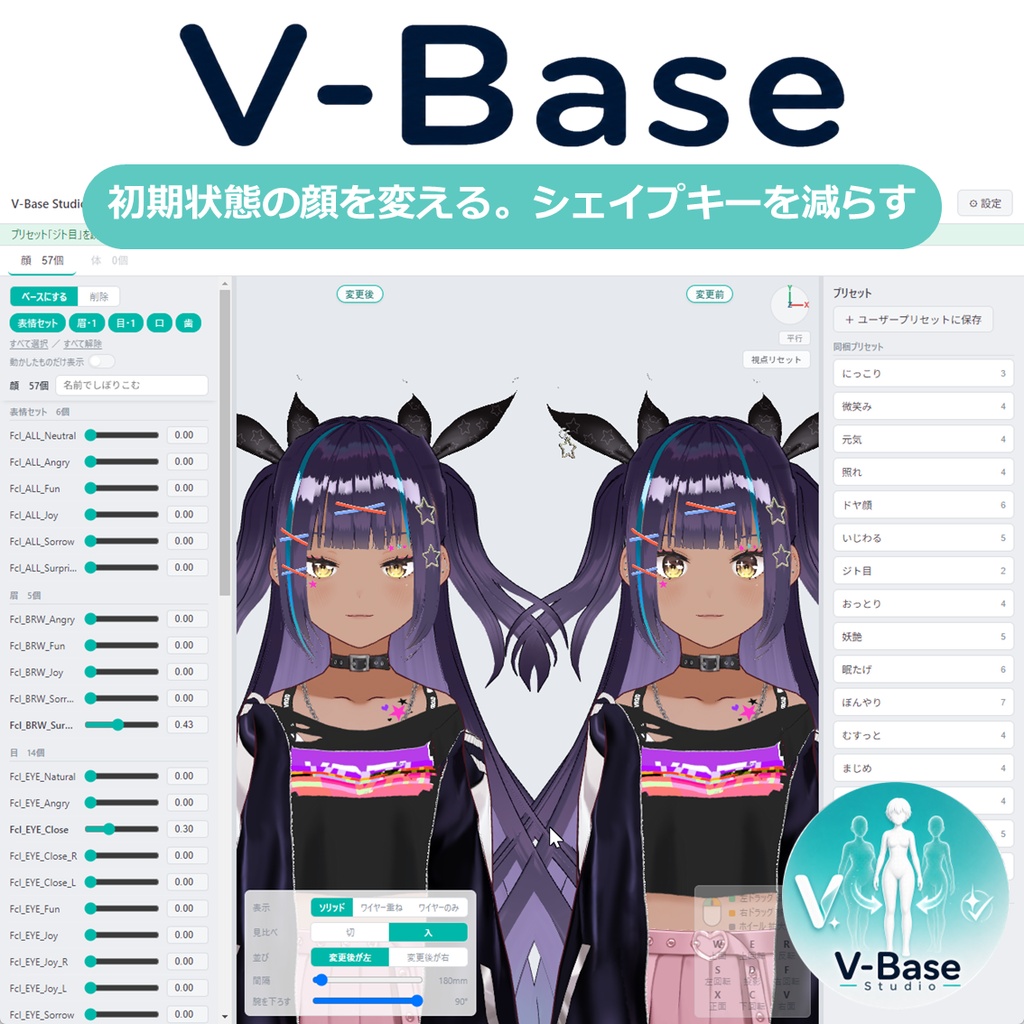
【VRM】V-Base Studio - 初期状態の顔を変える。シェイプキーを減らす。
◆商品概要 この子を「じと目」にしたい。いつも少し笑っている顔にしたい。 そう思っても、VRMを書き出すと顔はいつものままです。 シェイプキーは全部0に戻っているからです。 V-Base Studio は、モデルがもともと持っているシェイプキーを混ぜて、 その顔を「初期状態」にできるWindows用ツールです。 顔の型を16こ入れてあるので、押すだけで試せます。 あわせて、使っていないシェイプキーを消して軽くできます。 シェイプキーは思っているより重く、VRoid Studio のVRMは57本で約6MB。 パーフェクトシンク付きなら117本で約12.6MB=ファイルの3〜5割です。 まぶたしか動かない1本でも約0.11MBあります。 Unity も Blender も要りません。VRMを開いて、選んで、書き出すだけです。 ◆できることは2つです 【初期状態の顔を変える】 モデルが持っているシェイプキー(笑顔・じと目・への字口…)を混ぜて顔を作り、 それを「素の顔」として確定させます。 書き出したVRMは、開いた瞬間からその顔です。 顔の型を16こ、はじめから入れてあります。 にっこり/微笑み/元気/照れ/ドヤ顔/いじわる/ジト目/おっとり/ 妖艶/眠たげ/ぼんやり/むすっと/まじめ/クール/困り顔/泣きそう 押すだけでその顔になり、そこから自分で調整もできます。 VRoid Studio 製のモデルはシェイプキーの名前が共通なので、別のキャラにもそのまま当たります。 【シェイプキーを減らす】 使わないシェイプキーを選んで消します。表情のクリップの番号は自動でつけ直します。 消した分はそのままファイルが小さくなります。パーフェクトシンクの60本を消して約6.5MB(実測)。 どちらも、部位ごとに区切った一覧から選びます。目・口などで絞り込み、名前でも探せます。 変更前と並べて見比べながら決められます。自動では何もしません。 ◆内容 V-Base Studio 本体 取扱説明書(日本語・英語) 利用規約 ◆使用方法 1. ZIPを展開 2. V-Base Studio.exe を起動 3. 「VRMを開く」から VRMファイルを読み込み 4. いらないシェイプキーを選んで消す/素の形にしたいものはつまみを動かす 5. 「書き出し」から保存 - 使用方法動画 https://x.com/H3Atelier/status/2093499216459153686 ◆ご注意 ・素の顔を変えると、そのあとに作る表情の見え方も変わります。まばたきや喜怒哀楽は、変える前の顔を基準に作られているためです。 ・「消す」は、使っていないシェイプキーであれば影響しません。消したシェイプキーを使う表情だけが動かなくなります。 ・強さを1.0にしたシェイプキーは、その形で固定されるので、書き出したあと動かなくなります。 ・テクスチャ・骨・マテリアルには触りません。扱うのはシェイプキーだけです。 ・書き出したVRMの中では元に戻せません。書き出す前のVRMは必ず残してください。 ・VRoid Studio 製のVRM(0.x/1.0)が対象です。シェイプキーに名前が無いモデルは、一覧に出ないことがあります。 ・動作環境:Windows 10 / 11(64bit)。インストール不要・完全オフライン動作・日本語/英語。 ◆クレジット表記について クレジットの記載は不要です。 (ご利用は、読み込んだVRMの利用条件に従ってください。) ◆更新履歴 2026年8月29日 v1.1.0 ベースにしたあと、まばたきなどの表情が行き過ぎる件に対応する 書き出しの選択肢を追加しました(ベータ) 2026年8月28日 v1.0.0 公開 --- ◆Overview You want this character to have scornful eyes. Or a face that is always smiling a little. But when you export the VRM, the face is the usual one again, because every shape key is back at zero. V-Base Studio is a Windows tool that mixes the shape keys your model already has and makes the result the face it starts with. 16 face types are built in, so you can try them with one press. It also lets you remove shape keys you never use, and make the file lighter. Shape keys weigh more than people think: 57 of them take about 6MB. With PerfectSync, 117 keys and about 12.6MB, or 30 to 50% of the whole file. Even a key that only moves the eyelids is about 0.11MB. No Unity, no Blender. Open the VRM, pick, export. ◆Two things it does [Change the face it starts with] Mix the shape keys your model has (a smile, scornful eyes, a downturned mouth...) into a face, and fix that as the plain face. The VRM you export wears it from the moment it opens. 16 face types are built in: Smiling / Slight smile / Cheerful / Bashful / Smug / Sly / Scornful eyes / Gentle / Alluring / Sleepy / Vacant / Sulky / Earnest / Cool / Troubled / About to cry Press one and the face is there. You can adjust it from that point. VRoid Studio models share the same shape key names, so a preset works on another character too. [Cut down the shape keys] Pick the shape keys you do not need and remove them. Expression clip indices are renumbered automatically. Whatever you remove comes straight off the file size. Removing the 60 PerfectSync keys: about 6.5MB (measured). For both, you choose from a list split by group. Narrow it by eyes, mouth and so on, or search by name. Decide while comparing against the original beside it. Nothing happens automatically. ◆Contents V-Base Studio User manual (Japanese and English) Terms of use ◆How to use 1. Extract the ZIP 2. Start V-Base Studio.exe 3. Load a VRM with Open VRM 4. Pick the shape keys you do not need and remove them, or move the sliders for the ones you want as the base 5. Save with Export How-to Video: https://x.com/H3Atelier/status/2093499216459153686 ◆Please note ・Changing the plain face changes how expressions look afterwards. Blink and emotion shapes were built against the face as it was before. ・"Remove" does not affect anything as long as the shape key was unused. Only the expressions that used the removed key stop working. ・A shape key set to strength 1.0 is fixed at that shape, so it no longer moves after export. ・Textures, bones and materials are never touched. This tool handles shape keys only. ・Nothing can be undone inside the exported VRM. Always keep the VRM you had before exporting. ・For VRMs made with VRoid Studio (0.x / 1.0). Shape keys with no names may not appear in the list. ・Requirements: Windows 10 / 11 (64-bit). No installation, fully offline, Japanese and English. ◆About credit No credit is required. (Use is still subject to the terms of the VRM you loaded.) ◆Update history 2026/8/29 v1.1.0 Added an export option (beta) for expressions such as blinking          overshooting after you set a face as the base 2026/8/28 v1.0.0 Released ---